
Kebbi Robot Coding for Kids: Real-World Tech Skills at Lyza Education
When parents explore the robotics and coding programs at Lyza Education, one question frequently comes up: "Is learning on Kebbi and CodeLab transferable to standard computing skills, or is it just limited to this specific robot?"
It is natural to want reassurance that educational technology translates into long-term STEM literacy. Kebbi and CodeLab are intentionally built on industry-standard computational principles. The concepts learned through this platform directly mirror the fundamental logic used in mainstream software engineering, artificial intelligence, and real-world automation.

What is Kebbi?
Kebbi (specifically Kebbi Air) is an interactive, AI-powered social robot designed to serve as an intelligent hardware platform for young programmers. Unlike traditional screen-bound software, Kebbi combines physical movement, facial expression displays, voice synthesis, and environmental sensors into a single unified device.
The key features of Kebbi include:
Sensors: Camera vision for face/object detection, touch sensors, and microphone arrays for voice interaction.
Articulated Motors: High-precision motors that allow body movements, head turning, and physical gestures.
Interactive Screen: A display interface that functions as the robot's face, displaying emotion, graphics, or instructional prompts.
In an educational setting, Kebbi acts as a physical canvas. Instead of watching an avatar move on a computer screen, students write programs that command Kebbi to navigate physical spaces, respond to voice triggers, and interact with human users.
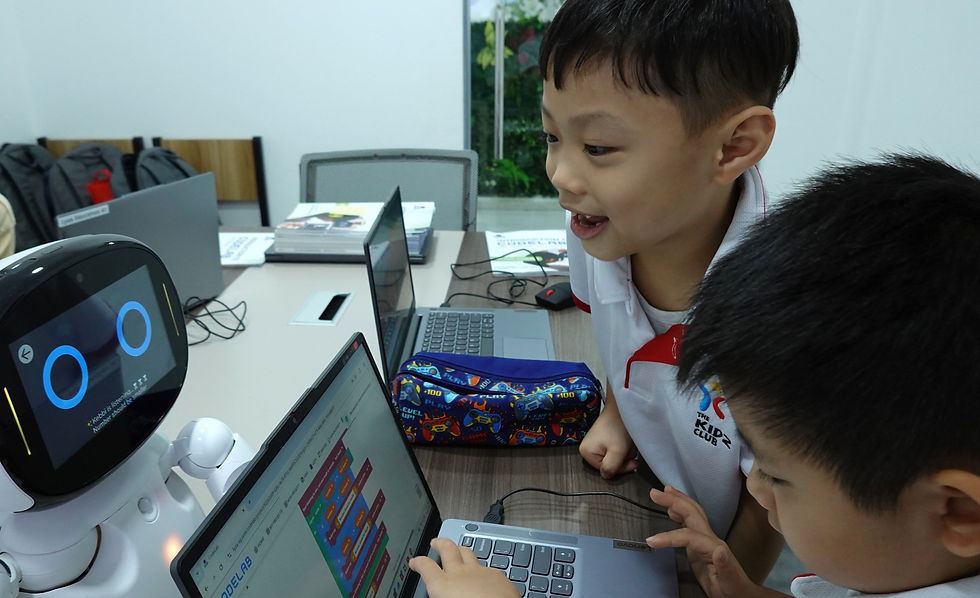
What is CodeLab?
CodeLab is a graphical, block-based programming environment specifically engineered to control Kebbi’s hardware and software systems.
Built on visual coding architecture (similar to MIT’s Scratch), CodeLab replaces complex syntax in mainstream programming languages such as Python and Java, lines of written text with colour-coded "puzzle blocks". Each block represents a specific programmatic command, such as moving a motor, speaking a phrase, or evaluating a sensor input.
Key features of CodeLab include:
Drag-and-Drop Interface: Eliminates syntax errors (like missing semicolons or typos) so students can focus entirely on logic.
Hardware-Specific Commands: Direct access to Kebbi’s internal systems, allowing students to program complex events like "If touch sensor is activated, turn head 45 degrees and play sound."
Variable and Event Management: Teaches core programming constructs such as conditional logic (if/then/else), loops (repeat/while), variables, and functions.

How Kebbi and CodeLab Empower Young Learners (Ages 7 to 9)
For children between 7 and 9 years old, brain development is transitioning from concrete operational thinking to abstract reasoning. Teaching abstract programming concepts purely on a screen can often lead to cognitive overload or frustration. Kebbi and CodeLab bridge this gap effectively.
1. Concrete Feedback for Abstract Logic
When a 7-year-old programs an algorithm that fails, seeing a line of error code on a monitor is abstract. However, when Kebbi turns left instead of right, the child can easily visualises the logic gap. Physical feedback makes debugging intuitive and rewarding.

2. High Engagement Through Social Robotics
Children naturally respond to objects that move, speak, and show personality. Kebbi’s social design converts coding from an isolated academic task into an interactive storytelling experience. Learners stay engaged longer because they are building behaviors for a physical companion.

3. Syntax-Free Logic Building
At ages 7 to 9, typing skills and reading stamina are still developing. CodeLab removes typing bottlenecks by using visual blocks. This allows young students to design complex conditional algorithms, the exact same logical flow used by professional developers, without being slowed down by keyboard mechanics.
How Kebbi and CodeLab Relate to the Real World
While Kebbi and CodeLab are tailored for friendly classroom interaction, the underlying mental models they teach are identical to those used in industrial automation, software development, and AI engineering.
Direct Connection to Mainstream Coding Tools
CodeLab's visual logic directly translates to Scratch (used in primary and secondary schools worldwide). Once a student masters logic blocks in CodeLab, transitioning to text-based languages like Python or Java simply requires learning new syntax, the core structural logic remains the same.
Understanding Real-World Robotics and IoT
The interaction between CodeLab (software) and Kebbi (hardware) mirrors how real-world systems operate:
Autonomous Cars: Kebbi reading a sensor to stop before hitting an obstacle uses the exact same Sensor Input -> Algorithm -> Motor Output pipeline as a self-driving Tesla or an automated warehouse robot.
Smart Home Technology: Programming Kebbi to respond to voice commands teaches the basic mechanics behind smart assistants like Amazon Alexa or Apple Siri.
AI & Computer Vision: Working with Kebbi’s facial and object recognition blocks introduces young learners to the foundational concepts of Machine Learning and Computer Vision without requiring advanced mathematics.
By starting with Kebbi and CodeLab at Lyza Education, young learners do not just play with a to, they master computational thinking, system architecture, and hardware-software integration. They leave equipped with a clear, real-world understanding of how modern technology works from the inside out.
Inspire Your Child’s Tech Journey with Lyza Education
Curiosity is the first step toward innovation. Experience how Kebbi and CodeLab make abstract computer science tangible, engaging, and fun.


Comments